Quick Reply
IMKit supports setting frequently used replies for one-to-one and group chat UIs.
tip
This feature is disabled by default in IMKit.
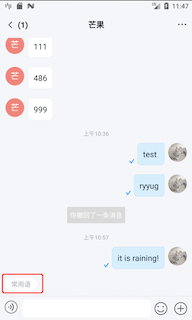
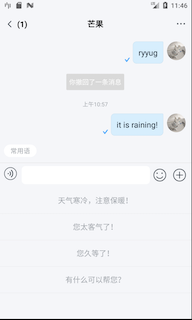
Limitations
- Each quick reply phrase supports up to 50 characters displayed in two lines. Exceeding this limit may truncate the text. To modify this, copy
rc_ext_quick_reply_list_item.xmlfrom the SDK to your main app directory and adjust theTextViewattributes to override default configurations.
Usage
IMKit SDK requires setting default quick reply phrases before initialization to enable this feature. Otherwise, it won't function.
RongConfigCenter.featureConfig().enableQuickReply(new IQuickReplyProvider() {
  @Override
  public List<String> getPhraseList(Conversation.ConversationType type) {
    List<String> phraseList = new ArrayList<>();
    phraseList.add("Hello!");
    return phraseList;
  }
});
To update quick replies, the new phrase list will overwrite existing ones. For IMKit ≤ 5.6.2, set phrases before launching the conversation UI to ensure updates appear. For IMKit ≥ 5.6.3, the UI refreshes immediately after updating phrases.
RongConfigCenter.featureConfig().enableQuickReply(new IQuickReplyProvider() {
  @Override
  public List<String> getPhraseList(Conversation.ConversationType type) {
    List<String> phraseList = new ArrayList<>();
    phraseList.add("Hello!");
    phraseList.add("You're too kind!");
    phraseList.add("Have you eaten?");
    return phraseList;
  }
});
Customization
Intercept Quick Reply Button Clicks
tip
Requires IMKit version ≥ 5.6.3.
Return true to intercept the quick reply button click event and implement custom logic, or false to proceed with SDK default behavior.
default boolean onQuickReplyClick(Context context) {
    return false;
}