Group Conversations by Type
The IMKit SDK supports grouping (collapsing) conversations by type in the conversation list. When grouping is enabled, conversations of the specified type are displayed as a single aggregated entry in the list. By default, the conversation list displays all local conversations in a flat structure.
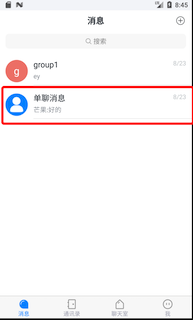
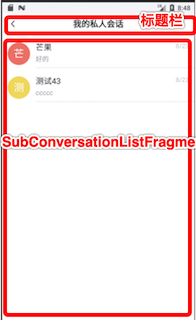
The diagram below illustrates the effect of grouping one-to-one chat conversations. In the conversation list, all one-to-one chats are collapsed into a One-to-One Chats entry (left). Tapping it navigates to the grouped conversation list (right).
The IMKit SDK includes a title bar implementation in the default grouped conversation page Activity (RongSubConversationListActivity). If you're building a grouped conversation list page based on Fragment, implement the title bar yourself.
Limitations
- Pinning is not supported for grouped conversation entries in the conversation list.
- Grouping is only supported by conversation type, not by conversation ID.
Configure Grouped Conversation Types
The grouped conversation feature supports one-to-one chats, group chats, and system conversations. You can implement a custom data processor by extending BaseDataProcessor and providing it to IMKit before opening the conversation list.
-
Declare a custom data processor class
MyAggregateDataProcessorthat extends the SDK'sBaseDataProcessor. Override theisGatheredmethod to returntruefor conversation types that should be grouped. The example below groups all system conversations.public class MyAggregateDataProcessor extends BaseDataProcessor<Conversation> {
/**
* Define supported conversation types for the custom conversation list page. Here we enable one-to-one, group, and system conversations.
*/
@Override
public Conversation.ConversationType[] supportedTypes() {
Conversation.ConversationType[] types = {Conversation.ConversationType.PRIVATE, Conversation.ConversationType.GROUP, Conversation.ConversationType.SYSTEM};
return types;
}
/**
* Define which conversations to group. Here we group one-to-one chats.
*/
@Override
public boolean isGathered(Conversation.ConversationType type) {
if (type.equals(Conversation.ConversationType.PRIVATE)) {
return true;
} else {
return false;
}
}
} -
Before opening the conversation list, set the data processor using
setDataProcessor.RongConfigCenter.conversationListConfig().setDataProcessor(new MyAggregateDataProcessor());
Grouped Conversation List Page
When grouping is enabled, conversations of the specified type are collapsed into a grouped conversation entry (GatheredConversation) in the list. Tapping this entry navigates to the grouped conversation list page.
IMKit provides grouped conversation list pages implemented as both an Activity and a Fragment.
- Activity-based: IMKit includes a default grouped conversation list page
RongSubConversationListActivity, which displays a title bar and a grouped conversation list. The SDK navigates to this Activity by default when opening a grouped conversation list. - Fragment-based: You can use IMKit's
SubConversationListFragmentto build a custom grouped conversation list page. Note that you must register your custom conversation list Activity with the IMKit SDK to replace the default grouped conversation list Activity.
Launch the Default Grouped Conversation List Page
To navigate to the grouped conversation list Activity from other parts of your app, use IMKit's built-in Activity router RouteUtils.
If you've built a custom conversation list Activity, you must register it with RouteUtils before using this method. Otherwise, the SDK will navigate to the default RongSubConversationListActivity.
Parameters
| Parameter | Type | Description |
|---|---|---|
| context | Context | Activity context |
| type | Conversation.ConversationType | Conversation type |
| title | String | Page title. If empty, the default title "Conversation List" is displayed. |
Example Code
RouteUtils.routeToSubConversationListActivity(context, conversationType, title);
The BaseDataProcessor abstract class is supported in stable versions of the 5.1.3.x series and all versions from 5.1.5 onward. For other versions, implement a DataProcessor class using the DataProcessor interface. For details, see Custom Data Processing.
Build a Grouped Conversation List Activity Using Fragment
If the default RongSubConversationListActivity doesn't meet your needs, we recommend using IMKit's SubConversationListFragment to build a custom grouped conversation list page.
Your custom grouped conversation list Activity must be registered with the IMKit SDK to replace the default grouped conversation list Activity.
-
Integrate IMKit's grouped conversation list Fragment into your app Activity. The example below declares a new
MyAggregateConversationListActivity.<activity
android:name="xxx.xxx.MyAggregateConversationListActivity"
android:screenOrientation="portrait"
android:windowSoftInputMode="stateHidden|adjustResize">
<intent-filter>
<action android:name="android.intent.action.VIEW" />
<category android:name="android.intent.category.DEFAULT" />
<data
android:host="${applicationId}"
android:pathPrefix="/subconversationlist"
android:scheme="rong" />
</intent-filter>
</activity> -
Implement the grouped conversation list layout. The example uses
activity_subconversation_list.xml.<?xml version="1.0" encoding="utf-8"?>
<LinearLayout xmlns:android="http://schemas.android.com/apk/res/android"
android:orientation="vertical"
android:layout_width="match_parent"
android:layout_height="match_parent">
<FrameLayout
android:id="@+id/container"
android:layout_width="match_parent"
android:layout_height="match_parent" />
</LinearLayout> -
Extend IMKit's
SubConversationListFragmentto create a subclass, such asAppSubConversationListFragment. Instantiate and useSubConversationListFragmentin theonCreatemethod ofMyAggregateConversationListActivity.SubConversationListFragment subconversationListFragment = new AppSubConversationListFragment();
FragmentManager manager = getSupportFragmentManager();
FragmentTransaction transaction = manager.beginTransaction();
transaction.replace(R.id.container, subconversationListFragment);
transaction.commit(); -
Register your custom grouped conversation list Activity with
RouteUtilsto replace IMKit's default implementation. This only needs to be done once in the app's lifecycle, in the main process.Parameters
Parameter Type Description activityType RongActivityType IMKit's built-in Activity type enum. Here, use RongActivityType.SubConversationListActivity.className Class<? extends Activity>Your custom grouped conversation list Activity class. Example Code
RouteUtils.registerActivity(RouteUtils.RongActivityType.SubConversationListActivity, MyAggregateConversationListActivity.class);After registration, the SDK will automatically navigate to your registered Activity when a grouped conversation list is needed.
Customization
When conversations are grouped by type, the conversation list displays a grouped conversation (GatheredConversation) entry. You can customize the avatar and nickname (title) for grouped conversations.
Set Grouped Conversation Avatar
You can set a custom avatar for grouped conversations (GatheredConversation) in the conversation list. By default, the RC default avatar is used.
Parameters
| Parameter | Type | Description |
|---|---|---|
| conversationType | ConversationType | Grouped conversation type |
| portraitUri | Uri | Custom avatar resource URI for the grouped conversation |
Example Code
RongConfigCenter.gatheredConversationConfig().setGatherConversationPortrait(conversationType, portraitUri);
Set Grouped Conversation Title
You can set a custom title for grouped conversations (GatheredConversation) in the conversation list. If not set, the default RC title rules apply. The default title varies by conversation type, as shown below:
| Grouped Conversation Type | Title | Resource Name |
|---|---|---|
| One-to-One Chat | "One-to-One Chats" | R.string.rc_gathered_conversation_private_title |
| Group Chat | "Group Chats" | R.string.rc_gathered_conversation_group_title |
| System | "System Messages" | R.string.rc_gathered_conversation_system_title |
To change the grouped conversation title, call the following method before opening the conversation list:
Parameters
| Parameter | Type | Description |
|---|---|---|
| conversationType | ConversationType | Grouped conversation type |
| title | String | Custom grouped conversation title |
Example Code
RongConfigCenter.gatheredConversationConfig().setConversationTitle(conversationType, title);
If you use IMKit's default grouped conversation page Activity (RongSubConversationListActivity), the grouped conversation title is also displayed in the title bar.