Chatroom Overview
Chatroom provides a business model with no user limit and supports high-concurrency message processing, suitable for scenarios like live streaming, communities, gaming, social networking, and interest discussions. Key features of chatrooms include:
- No limit on the number of chatrooms that can be created under an App Key, and no limit on the number of members in a single chatroom.
- Chatrooms have an automatic destruction mechanism. By default, all chatrooms will automatically kick out all members and self-destruct after 1 hour of inactivity (no member joins/leaves or new messages). This duration can be extended or configured for scheduled destruction. For details, see the server documentation Chatroom Destruction Mechanism.
- Chatrooms have an automatic member removal mechanism for offline users. When preset conditions are met, the RC server will remove chatroom members. See Exit Chatroom.
- Local chatroom messages are deleted when leaving the chatroom. To store historical messages for chatrooms long-term on RC's server, please submit a ticket to enable the Cloud Storage for Chatroom Messages service. Once enabled, chatroom history messages are stored in the cloud by default for 2 months.
- Chatrooms do not support offline message-to-push conversion. Only online chatroom members can receive chatroom messages.
Client UI Framework Reference Design
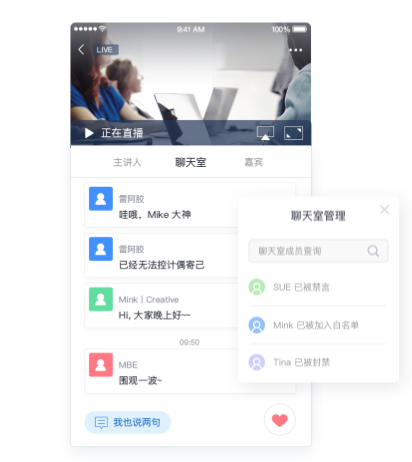
Chatroom products currently do not provide dedicated UI components for chatroom conversations. You can refer to the following UI framework design to understand the chatroom design approach.
- The Chatroom tab in the image below shows the chatroom message list.
- The Chatroom Management window displays some supported capabilities, such as muting, banning, allowlists, etc.
Service Configuration
The client SDK supports chatrooms by default and does not require activation.
Some basic features and value-added services for chatrooms can be enabled and configured in the Service Configuration pages of the IM service in the Console.
Chatroom Feature APIs
Chatroom session relationships are established and maintained by RC. The SDK provides some chatroom management APIs such as join and exit. More chatroom management features require the use of the IM server API. The table below describes the main chatroom feature APIs provided by RC.
| Feature Category | Description | Client API | RC Server API |
|---|---|---|---|
| Chatroom Creation & Destruction | Manually create or destroy a chatroom. Note: The client SDK does not have a dedicated API for creating chatrooms. The client does not provide an API for manually destroying chatrooms. | Not provided | Create Room, Destroy Room |
| Join & Exit Chatroom | Join an existing chatroom. Ensure the chatroom ID exists. Only the client provides APIs for joining and exiting chatrooms. Note: The client has deprecated APIs that support creating a chatroom if it doesn't exist before joining, but these are no longer recommended. | Join Chatroom, Exit Chatroom | Not provided |
| Query Chatroom & User Info |
| Get Chatroom Info | Get Room Info |
| Chatroom Attribute Management | Set custom attributes in a specified chatroom. For example, in a voice live streaming chatroom, this feature can be used to record attributes of different microphone positions; or in card games like Werewolf, to record user roles and game states. Chatroom attributes are stored as Key-Value pairs, supporting set, delete, and query operations, as well as batch and forced operations. | Chatroom Attributes | Attribute Management (KV) |
| Ban/Unban Chatroom User | Ban one or more chatroom members. Banned members will be removed from the specified chatroom and cannot rejoin during the ban period. | Not provided | Member Ban |
| Chatroom User Allowlist | Enabled by default in the development environment (dev). In production environments, this feature is enabled by default for Chat Pro Plan and is not supported for Chat Starter Plan. Users added to a chatroom's allowlist will have their messages protected from being discarded during high message volume and will not be automatically kicked by the RC server. | Not provided | Chatroom Allowlist Service |
| Send Chatroom Message | Send chatroom messages. | Send Message | Send Chatroom Message |
| Recall Chatroom Message | Recall chatroom messages. | Recall Message | Message Recall |
| Get Chatroom History Messages | Retrieve chatroom history messages. | Get Chatroom History Messages | History Message Log |
| Chatroom Low-Priority Messages | Enabled by default in the development environment (dev). In production environments, this feature is enabled by default for Chat Pro Plan and is not supported for Chat Starter Plan. If a message type is in the low-priority message list, all messages of that type are treated as low-priority. When server load is high, high-priority messages are retained first, while low-priority messages are discarded first. By default, all messages are high-priority. | Not provided | Chatroom Message Priority Service |
| Chatroom Message Allowlist | Enabled by default in the development environment (dev). In production environments, this feature is supported only for Chat Pro Plan and is not supported for Chat Starter Plan. If a message type is in the chatroom message allowlist, all messages of that type are protected and will not be discarded even during high message volume. | Not provided | Chatroom Allowlist Service |
| Mute Chatroom Member | Mute one or more members in a specified chatroom. Muted members can receive and view chatroom messages but cannot send messages to the chatroom. | Not provided | Mute a User |
| Mute All Members | Mute all members in a chatroom or cancel the mute status for all members in a specified chatroom. When all members are muted, no member can send messages to the chatroom via the client SDK. | Not provided | Mute All |
| Mute Exceptions | Add one or more members to the chatroom's mute exception list. Members added to this list can still send messages to the chatroom via the client SDK even when the chatroom is in a mute-all state. | Not provided | Mute All |
| Global Mute User | Enabled by default in the development environment (dev). In production environments, this feature is supported only for Chat Pro Plan and is not supported for Chat Starter Plan. Add one or more users to the chatroom global mute list. Users in this list cannot send messages in any chatroom under the application. | Not provided | Global Mute |
Differences from Groups and Ultra Groups
You can learn about the differences between business types and all features through the following documentation: