Monitoring Chatroom Events
The chatroom service provides client apps with three types of event listeners: Chatroom Status Listener, Chatroom Member Change Listener, and Chatroom Event Notification Listener. Through these listeners, client apps can obtain information from RC servers about chatroom destruction status, user join/leave status in current and other clients, member entry/exit event notifications in chatrooms, as well as member mute and ban-related information in chatrooms.
Parameter Description
| Listener | Name | Description |
|---|---|---|
| [ChatRoomAdvancedActionListener] | Chatroom Status Listener | Receives events when the currently logged-in user joins or leaves a chatroom, as well as chatroom destruction status information. |
| [ChatRoomMemberActionListener] | Chatroom Member Change Listener | Receives information about other users joining or leaving the chatroom where the current user is present. |
| [ChatRoomNotifyEventListener] | Chatroom Event Notification Listener | Receives information about member mutes and bans in the current chatroom; receives information about the current user joining or leaving chatrooms on other devices. |
Monitoring Chatroom Status
Applications can monitor events where users join or leave chatrooms on the current client, as well as changes in chatroom destruction status.
Use RongChatRoomClient's addChatRoomAdvanceActionListener or setChatRoomAdvancedActionListener to add or set the [ChatRoomAdvancedActionListener] listener.
Sample Code
// addChatRoomAdvanceActionListener, since 5.2.5
RongChatRoomClient.addChatRoomAdvanceActionListener(
                new ChatRoomAdvancedActionListener() {
                    @Override
                    public void onJoining(String chatRoomId) {
                        // default implementation ignored
                    }

                    @Override
                    public void onJoined(String chatRoomId) {
                        // Successfully joined chatroom (deprecated)
                        // default implementation ignored
                    }

                    @Override
                    public void onJoined(String chatRoomId, JoinChatRoomResponse joinChatRoomResponse) {
                        // Successfully joined chatroom since 5.6.3
                        // default implementation ignored
                    }

                    @Override
                    public void onReset(String chatRoomId) {
                        // default implementation ignored
                    }

                    @Override
                    public void onQuited(String chatRoomId) {
                        // default implementation ignored
                    }

                    @Override
                    public void onDestroyed(String chatRoomId, ChatRoomDestroyType type) {
                        data.setFirstAndNotify(Pair.create(chatRoomId, type));
                    }

                    @Override
                    public void onError(String chatRoomId, CoreErrorCode code) {
                        // default implementation ignored
                    }
                });


// setChatRoomAdvanceActionListener
RongChatRoomClient.setChatRoomAdvanceActionListener(listener);
Removing the listener:
Sample Code
// removeChatRoomAdvanceActionListener, since 5.2.5
RongChatRoomClient.addChatRoomAdvanceActionListener(listener);
// setChatRoomAdvanceActionListener
RongChatRoomClient.setChatRoomAdvanceActionListener(null);
Chatroom Status Events
Below lists the events and callback methods provided by the chatroom operation listener ChatRoomAdvancedActionListener.
Parameter Description
| Callback Method | Trigger Condition | Description |
|---|---|---|
onJoining(String chatRoomId) | Current user is joining a chatroom | Returns data including: chatroom ID |
onJoined(String chatRoomId, JoinChatRoomResponse) | Current user has joined a chatroom (available since 5.6.3). | Returns data including: chatroom ID, chatroom room information, and user status in the chatroom. |
onJoined(String chatRoomId) | Current user has joined a chatroom (deprecated since 5.6.3) | Returns data including: chatroom ID |
onReset(String chatRoomId) | User's current chatroom has been reset. | Returns data including: chatroom ID. Note: After successfully joining a chatroom, if the chatroom is reset, this callback will be received, followed immediately by onJoining and onJoined callbacks. |
onQuited(String chatRoomId) | Current user has left a chatroom | Returns data including: chatroom ID |
onDestroyed(String chatRoomId, IRongCoreEnum.ChatRoomDestroyType type) | Current user is online and their chatroom has been destroyed | Returns data including: chatroom ID, chatroom destruction type. Destruction type ChatRoomDestroyType.MANUAL indicates the chatroom was destroyed by actively calling the IM Server API. ChatRoomDestroyType.AUTO indicates automatic chatroom destruction. |
onError(String chatRoomId, IRongCoreEnum.CoreErrorCode code) | Chatroom operation exception | Returns data including: chatroom ID, error code. |
Monitoring Chatroom Member Changes
The SDK has supported monitoring chatroom member changes since version 5.1.4.
Starting from version 5.1.4, the SDK provides [ChatRoomMemberActionListener] in RongChatRoomClient, allowing currently logged-in users to monitor join/leave behaviors of other members in the same chatroom.
Enabling the Service
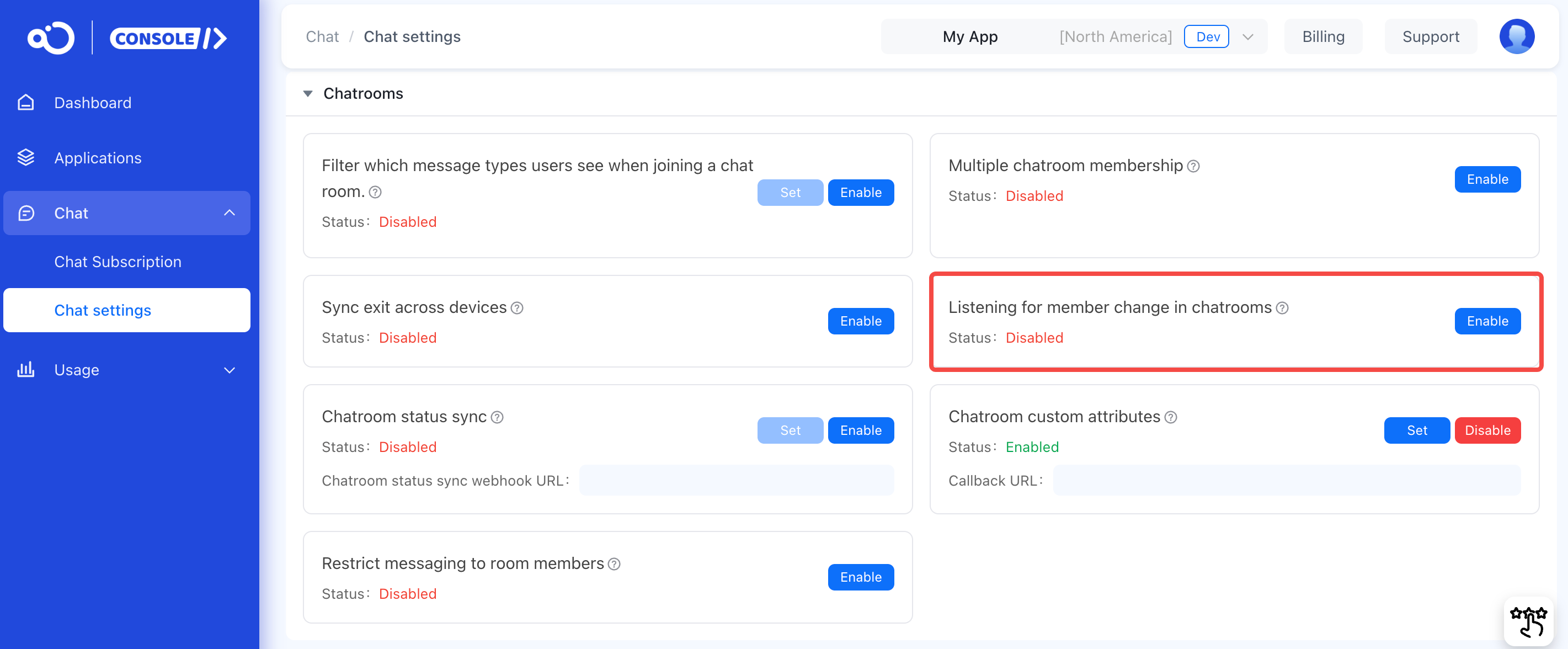
You can enable this feature in the RC Console under Chat > Chat settings > Chatroom > Chatroom Member Change Monitoring. Once enabled, the system will send callback notifications to other chatroom members when users join or leave, which will increase message volume.
Setting Up Chatroom Member Change Listener
Use the [ChatRoomMemberActionListener] method to set up a chatroom member change listener. Starting from version 5.6.7, a new callback method returning a [ChatRoomMemberActionModel] object has been added, which includes the current chatroom member count.
Sample Code
RongChatRoomClient.setChatRoomMemberListener(new RongChatRoomClient.ChatRoomMemberActionListener() {
    /**
     * @param chatRoomMemberActions
     * @param roomId
     */
    @Override
    public void onMemberChange(List<ChatRoomMemberAction> chatRoomMemberActions, String chatRoomId) {
        // Handle the member change with the list of ChatRoomMemberAction objects and the chatRoomId
    }

    /**
     * @since 5.6.7
     */
    @Override
    public void onMemberChange(ChatRoomMemberActionModel model) {
        // Handle the member change with the ChatRoomMemberActionModel object
        String chatroomId = model.getRoomId();
        List<ChatRoomMemberAction> chatRoomMemberActions = model.getChatRoomMemberActions();
        int memberCount = model.getMemberCount();

        for (ChatRoomMemberAction action : chatRoomMemberActions) {
            // Access the properties of ChatRoomMemberAction object
            String userId = action.getUserId();
            ChatRoomMemberAction.ChatRoomMemberActionType actionType = action.getChatRoomMemberAction();

            if (actionType == ChatRoomMemberAction.ChatRoomMemberActionType.CHAT_ROOM_MEMBER_JOIN) {
                            System.out.println("Action Type: Join");
                        } else if (actionType == ChatRoomMemberAction.ChatRoomMemberActionType.CHAT_ROOM_MEMBER_QUIT) {
                            System.out.println("Action Type: Leave");
                        }
        }
    }
});
When other users join or leave the chatroom, the SDK triggers both `onMemberChange` callback methods simultaneously, with callbacks occurring on the UI thread. The [ChatRoomMemberAction] list contains information about members who joined or left the chatroom. The [ChatRoomMemberActionModel] additionally encapsulates the current chatroom member count (referring to users who have joined but not left). We recommend using the `onMemberChange` method that returns the `ChatRoomMemberActionModel` object.

If the current user disconnects from RC due to network issues and leaves the chatroom, they cannot monitor join/leave behaviors of other members during the disconnection period.


## Monitoring Chatroom Event Notifications

:::tip

The SDK has supported monitoring chatroom event notifications using the [RCChatRoomNotifyEventListener] method since version 5.4.5.
:::

Applications can monitor notifications related to member muting/banning in the current chatroom, as well as notifications about the current user joining/leaving chatrooms on other devices.

Use the `addChatRoomNotifyEventListener` method of `RongChatRoomClient` to add a [ChatRoomNotifyEventListener] listener.


#### Parameter Description

| Callback Method                                                | Trigger Condition                                           | Description                                                                                 |
|---------------------------------------------------------|------------------------------------------------|------------------------------------------------------------------------------------|
| onChatRoomNotifyMultiLoginSync(ChatRoomSyncEvent event) | When a user joins/leaves chatrooms on other devices in a multi-device login scenario | Receives events about the current user joining/leaving chatrooms on the current client                                          |
| onChatRoomNotifyBlock(ChatRoomMemberBlockEvent event)   | When muting/unmuting events occur in the user's chatroom      | Whether notifications are received depends on whether the `needNotify` parameter is set to `true` when calling server-side ban/unban APIs. |
| onChatRoomNotifyBan(ChatRoomMemberBanEvent event)       | When user banning/unbanning events occur in the chatroom    | Whether notifications are received depends on whether the `needNotify` parameter is set to `true` when calling server-side ban/unban APIs. |


#### Sample Code

```java
// Since 5.4.5
RongChatRoomClient.addChatRoomNotifyEventListener(
        new RongChatRoomClient.ChatRoomNotifyEventListener() {
            @Override
            public void onChatRoomNotifyMultiLoginSync(ChatRoomSyncEvent event) {

            }

            @Override
            public void onChatRoomNotifyBlock(ChatRoomMemberBlockEvent event) {

            }

            @Override
            public void onChatRoomNotifyBan(ChatRoomMemberBanEvent event) {

            }
        });

// Remove
RongChatRoomClient.removeChatRoomNotifyEventListener(listener);


### Multi-Device Login Event Notification

When a user logs in on multiple devices and joins/leaves chatrooms on other clients, the `onChatRoomNotifyMultiLoginSync(ChatRoomSyncEvent event)` method is triggered.


#### Parameter Description

| Trigger Scenario                                                            | Notification Scope                          | Description                                                                                                           |
|-----------------------------------------------------------------|-------------------------------|--------------------------------------------------------------------------------------------------------------|
| Multi-device login user joins a chatroom on one device                                 | The currently joining user                    | When the user joins a chatroom on one device, online devices will receive notifications while offline devices won't. Returns data including: chatroom ID and join time.  |
| Multi-device login user leaves a chatroom on one device                                 | The currently leaving user                    | When the user leaves a chatroom on one device, online devices will receive notifications while offline devices won't. Returns data including: chatroom ID and leave time. |
| Multi-device login user already in a chatroom gets kicked from previous chatroom when joining a new one | The current user and all members of the kicked chatroom | If **Single User Joining Multiple Chatrooms** is enabled in the console, no notification will be sent. Returns data including: chatroom ID and kick time.               |

The `ChatRoomSyncEvent` attributes are defined as follows:


| Attribute       | Type                     | Description                                                                                                                                                                               |
|----------------|--------------------------|------------------------------------------------------------------------------------------------------------------------------------------------------------------------------------------|
| `chatroomId`   | String                   | Chatroom ID.                                                                                                                                                                             |
| `status`       | ChatRoomSyncStatus       | Status change: `Quit(0)` - Leave; `Join(1)` - Join.                                                                                                                                      |
| `reason`       | ChatRoomSyncStatusReason | When `status` is `Quit`, indicates the leave type: `LeaveOnMyOwn(1)` means voluntary leave; `OtherDeviceLogin(2)` means kicked due to multi-device login. Ignore when `status` is `Join`. |
| `time`         | long                     | Timestamp (millisecond precision) of user joining/exiting/being kicked.                                                                                                                  |
| `extra`        | String                   | Additional information.                                                                                                                                                                  |


### Block-Related Event Notifications

When a block/unblock event occurs in the user's chatroom and the relevant Server API is called with `needNotify` set to `true`, the `onChatRoomNotifyBlock(ChatRoomMemberBlockEvent event)` method is triggered.


#### Parameter Description

| Trigger Scenario                                                                 | Notification Scope       | Description                                                                                                |
|----------------------------------------------------------------------------------|--------------------------|-----------------------------------------------------------------------------------------------------------|
| [Block Chatroom User][doc-page-封禁聊天室用户]                                   | All chatroom members     | Returns data including: chatroom ID, list of blocked user IDs, block time and duration, additional info.   |
| [Unblock Chatroom User][doc-page-解除封禁聊天室用户]                             | Unblocked members        | Returns data including: chatroom ID, current user ID, additional info.                                    |

`ChatRoomMemberBlockEvent` attribute definitions:

| Attribute        | Type                | Description                                                                                                   |
|------------------|---------------------|--------------------------------------------------------------------------------------------------------------|
| `chatroomId`     | String              | Chatroom ID.                                                                                                 |
| `operateType`    | ChatRoomOperateType | Block type: `Deblock(0)` - Unblock; `Blocked(1)` - Block.                                                    |
| `durationTime`   | long                | Block duration in milliseconds (max: 43200 minutes/1 month; min: 1 minute). Valid when `operateType` is `Blocked`. |
| `operateTime`    | long                | Operation timestamp (milliseconds).                                                                          |
| `userIdList`     | List\<String\>      | List of blocked user IDs. For unblocking, shows current user ID.                                             |
| `extra`          | String              | Additional information.                                                                                      |


### Mute-Related Event Notifications

When mute/unmute events occur in the user's chatroom and the relevant Server API is called with `needNotify` set to `true`, the `onChatRoomNotifyBan(ChatRoomMemberBanEvent event)` method is triggered.


#### Parameter Description

| Trigger Scenario                                                                 | Notification Scope       | Description                                                                                                |
|----------------------------------------------------------------------------------|--------------------------|-----------------------------------------------------------------------------------------------------------|
| [Mute Specified Chatroom User][doc-page-禁言指定聊天室用户]                      | All chatroom members     | Returns data including: chatroom ID, list of muted user IDs, mute time and duration, additional info.      |
| [Unmute Specified Chatroom User][doc-page-取消禁言指定聊天室用户]                | All chatroom members     | Returns data including: chatroom ID, list of unmuted user IDs, unmute time, additional info.              |
| [Set Chatroom-Wide Mute][doc-page-设置聊天室全体禁言]                            | All chatroom members     | Returns data including: chatroom ID, mute time, additional info.                                          |
| [Remove Chatroom-Wide Mute][doc-page-取消聊天室全体禁言]                          | All chatroom members     | Returns data including: chatroom ID, unmute time, additional info.                                         |
| [Add to Chatroom Mute Allowlist][doc-page-加入聊天室全体禁言白名单]              | All chatroom members     | Returns data including: chatroom ID, list of allowlisted user IDs, allowlist time, additional info.       |
| [Remove from Chatroom Mute Allowlist][doc-page-移出聊天室全体禁言白名单]         | All chatroom members     | Returns data including: chatroom ID, list of removed user IDs, removal time, additional info.             |
| [Global User Mute][doc-page-全局禁言用户]                                        | Globally muted users     | Returns data including: chatroom ID, mute time and duration, additional info.                             |
| [Remove Global User Mute][doc-page-取消全局禁言用户]                              | Globally unmuted users   | Returns data including: chatroom ID, unmute time, additional info.                                         |

`ChatRoomMemberBanEvent` attribute definitions:

| Attribute        | Type                    | Description                                                                                           |
|------------------|-------------------------|------------------------------------------------------------------------------------------------------|
| `chatroomId`     | String                  | Chatroom ID.                                                                                         |
| `banType`        | [ChatRoomMemberBanType] | Chatroom mute/unmute operation type enum                                                             |
| `durationTime`   | long                    | Mute duration in milliseconds (max: 43200 minutes/1 month; min: 1 minute). Valid for mute operations. |
| `operateTime`    | long                    | Operation timestamp (milliseconds).                                                                  |
| `userIdList`     | List\<String\>          | List of muted user IDs. For unmuting, shows current user ID.                                        |
| `extra`          | String                  | Additional information.                                                                              |