Multi-Device Message Synchronization
In instant messaging services, a single user account may be logged in on multiple devices. Multi-Device Message Synchronization is a service provided by RC's server to synchronize message sending and receiving across multiple devices under the same user account.
By default, RC does not synchronize messages between devices. When a new message is received by one device, other devices cannot receive it.
Applicable Scenarios
In RC's instant messaging services, Multi-Device Message Synchronization applies in the following situations:
-
When the same user account is simultaneously online on multiple devices (regardless of platform) and wishes to synchronize message sending/receiving. For example, a user may own multiple mobile devices, such as two Android devices and one iOS device.
tipRC supports multi-platform simultaneous online by default, allowing a single user account to be online on one mobile, Web, desktop, and mini-program device simultaneously. However, if you need to allow app users to be online on multiple mobile devices or multiple mini-program devices simultaneously, you must submit separate tickets. See Multi-Platform Simultaneous Online. :::
-
When a user switches devices (regardless of whether they have logged in on that device before) and wishes to synchronize message history. For example, when a user logs out from an Android device and switches to logging in via Web on another device.
-
When a user uninstalls and reinstalls the app on the same device and wishes to synchronize message history.
Messages Supported for Multi-Device Synchronization
Not all messages support multi-device synchronization. Status messages can only be synchronized when multiple devices are simultaneously online; offline devices cannot receive these messages via Multi-Device Message Synchronization.
The following are considered status messages:
-
Messages defined as status messages in RC's built-in message types. Built-in status messages include: typing status messages (
RC:TypSts). -
Custom status message types. Refer to the "Custom Messages" documentation for each client.
-
All messages sent via server API status message interfaces (regardless of message type) do not support synchronization. Specific API interfaces include sending private status messages (
/statusmessage/private/publish.json) and sending group status messages (/message/group/publish.json).
Enabling the Service
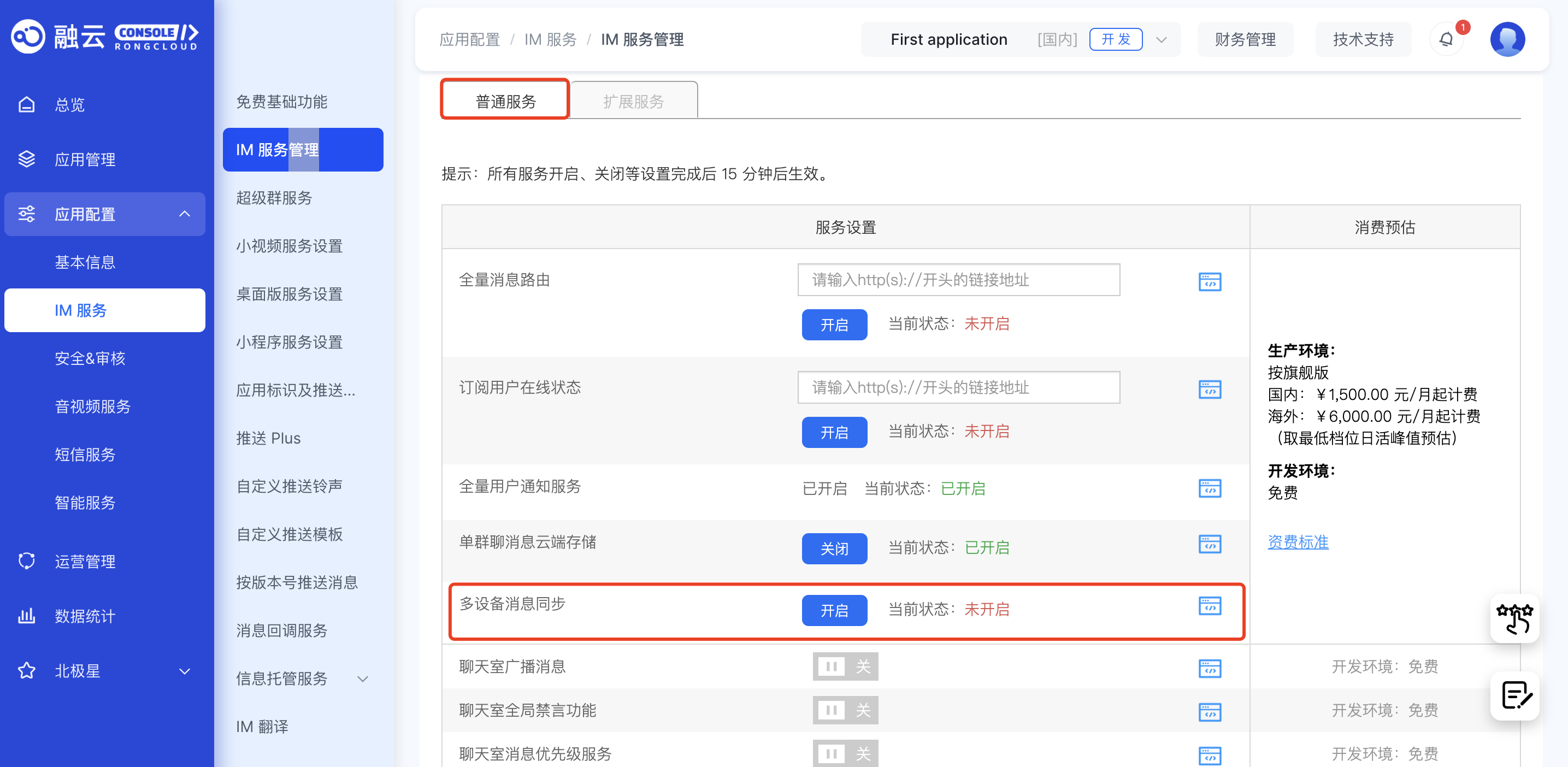
Go to the Console, navigate to the Feature Settings page under IM services, and enable the Multi-Device Message Synchronization service. This service is free to use in the development environment and is disabled by default. In the production environment, prepayment is required to enable the service.
Changes to service enable/disable settings take effect within 15 minutes.
Impact on Other Features or Services
The status of the Multi-Device Message Synchronization service affects offline message compensation?, message recall, chatroom services, and other aspects of instant messaging.
Impact on Offline Compensation
The Multi-Device Message Synchronization service in the Console includes a toggle for RC's server-side offline compensation mechanism?.
When the Multi-Device Message Synchronization service is enabled, RC's server automatically activates the offline compensation mechanism for the app. This mechanism triggers in the following scenarios:
-
Switching devices. After a user logs in on a new device (regardless of whether they have logged in on it before), the SDK can retrieve messages sent and received on other terminals within a specified number of recent days (default: 1 calendar day).
-
App reinstallation. Messages and conversation lists are stored in the local database, which is deleted when the app is uninstalled. When the user reinstalls the app and reconnects, RC's server-side offline compensation mechanism is triggered, allowing the SDK to retrieve messages sent and received on other terminals within a specified number of recent days (default: 1 calendar day).
tipIn scenarios involving switching devices or app reinstallation, the offline compensation mechanism can only retrieve conversations from the most recent period (default: 1 day, maximum: 7 days). Conversations older than this period cannot be retrieved via offline compensation. As a result, the post-compensation conversation list may not match the original device's or pre-uninstallation list (you may feel like some conversations are missing).
To modify the number of days for offline message compensation, submit a ticket. Exercise caution when adjusting this setting, as excessive message volumes for a single user may create significant processing pressure on the client due to large compensation message loads.
Impact on Web Platform Connection Limits
When the Multi-Device Message Synchronization service is enabled, a single user can maintain up to 10 Web connections (each browser tab counts as one connection). Connections beyond this limit will automatically disconnect the earliest Web connection.
Impact on Message Recall
-
When the Multi-Device Message Synchronization service is disabled, recalled messages cannot be synchronized across devices.
-
When the service is enabled, if the sender recalls a message, other online devices will synchronize the recall in real-time. For offline devices, the recall will be synchronized once the user logs in.
Impact on Server API Message Sending
When sending messages via server API, some interfaces allow specifying whether the sender can receive the sent message on the client via the isIncludeSender parameter.
-
When the Multi-Device Message Synchronization service is disabled, messages sent via Server API are only synchronized to the sender's online client in real-time if the sender is logged in. Offline clients cannot receive them.
-
When the service is enabled, messages sent via Server API while the sender is offline will be synchronized to the sender's client upon their next login.