Ultra Group Overview
- The IMLib SDK has supported Ultra Group features since version 5.2.0.
- Unless otherwise specified, most Ultra Group interfaces are located in
RCChannelClient.
RongCloud Ultra Groups (UltraGroup) provide a new form of group communication. With no upper limit on group members, Ultra Groups allow users to establish social relationships within super communities and focus on content of interest amidst massive information flows, helping developers build highly engaging communities. Ultra Group members can join up to 100 Ultra Groups, with all channels under the same Ultra Group sharing the same member relationships. There is no limit to the number of Ultra Groups within an app.
The conversation type (ConversationType) for Ultra Group services is ConversationType_ULTRAGROUP, where targetId represents the Ultra Group ID and channelId represents the Ultra Group channel ID.
Service Activation
The Ultra Group feature is available in the development environment (dev). In production environments, this feature is supported for Chat Pro Plan and is not supported for Chat Starter Plan.
Channel Usage
Ultra Groups support creating independent channels within group conversations (specified by channelId on the client side, corresponding to busChannel on the server side). Conversation data such as messages and unread counts, as well as group members, can be aggregated by channel, with messages being independent across channels.
Channels are categorized into public channels and private channels. Public channels are open to all Ultra Group members (no joining required). All members of the Ultra Group receive messages from public channels. Private channels are only accessible to users on the channel's member list. For detailed information about private channels, refer to Ultra Group Private Channel Overview.
Ultra Group services provide a default channel with the ID RCDefault. The RCDefault channel is open to all Ultra Group members and cannot be converted to a private channel.
For app scenarios that only require group chat-like functionality, you can leverage the unlimited member capacity of Ultra Groups to create super-large groups with more than 3,000 members. In this case, all messages can be sent and received in the RCDefault default channel. It is recommended to specify the channel ID as RCDefault when calling client-side or server-side APIs.
For Discord-like community scenarios, you can use Ultra Group channels to build sub-communities. It is recommended to exclusively use custom-created channels for your business logic. The behavior of the default channel (RCDefault) differs from that of custom channels, and using only custom channels avoids potential limitations in implementing app business logic.
If your app/environment activated Ultra Group services before October 13, 2022, your Ultra Group services will not include the RCDefault channel. When calling client-side or server-side APIs without specifying a channel ID, the operations will generally only affect messages not belonging to any channel. Specific behaviors should be referenced in the respective feature documentation. RongCloud supports adjusting services to the latest behavior. This adjustment will affect multiple functionalities, including message sending/receiving, conversation retrieval, history message clearing, and muting on both client and server sides. If needed, please submit a ticket for detailed solutions.
Client UI Framework Reference Design
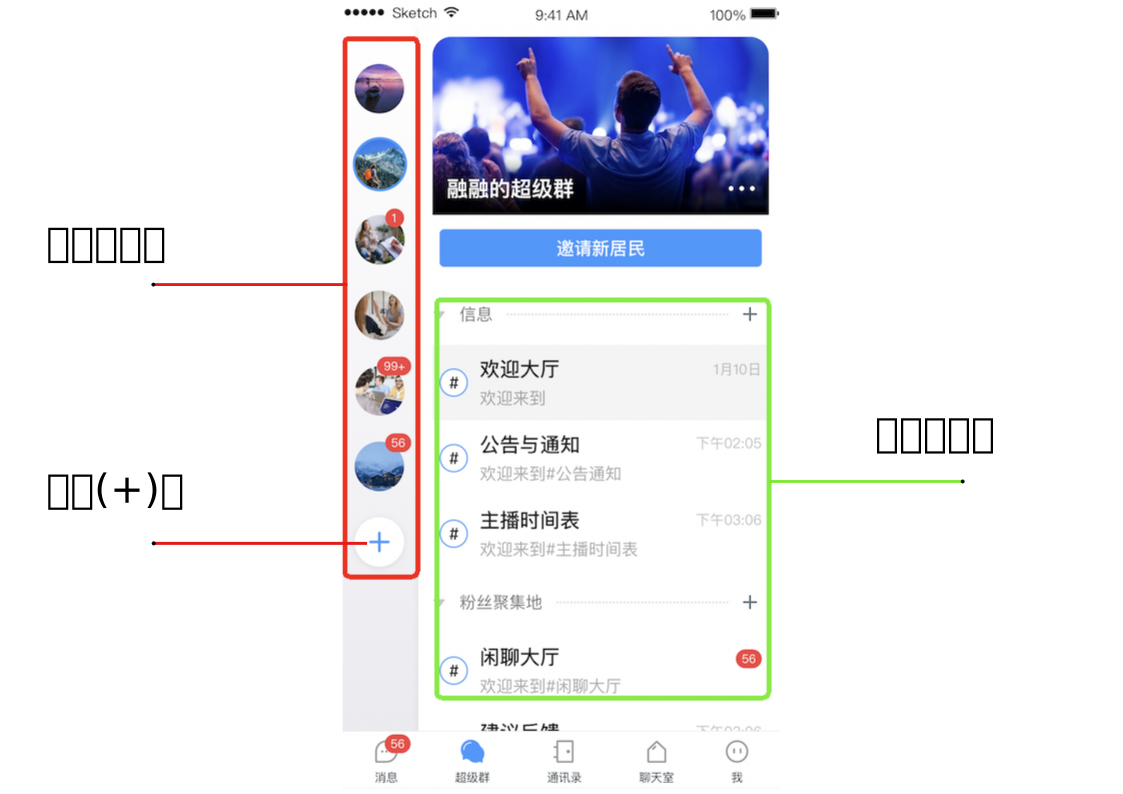
The Ultra Group product does not currently provide UI components. You can refer to the following UI framework design to understand the design approach for Ultra Group apps.
- The red box on the left side of the diagram below shows the Ultra Group list, which displays the current logged-in user's Ultra Groups. The plus (+) button at the bottom of the red box represents creating a new Ultra Group.
- The green box above shows the Ultra Group channel (Channel) list. Each Ultra Group channel is specified by a channel ID (
channelId).
Ultra Group Management Interfaces
Ultra Groups do not support group data hosting capabilities. All Ultra Group business logic must be implemented on the app server.
For client developers, basic management operations such as group and channel creation only require interaction with the app server. The app server needs to call the corresponding RongCloud server API (Server API) interfaces for operations like creating Ultra Groups and channels.
The table below lists the basic Ultra Group management interfaces provided by RongCloud.
The Server API also provides additional management interfaces such as Ultra Group-wide muting and user muting. For details, refer to the RongCloud Server API Ultra Group Documentation.
| Feature Category | Description | Client API | RongCloud Server API |
|---|---|---|---|
| Create/Dismiss Ultra Group | Provide creator user ID, Ultra Group ID, and group name to request group creation from RongCloud. Dismissing an Ultra Group removes all member relationships. | Not available | Create Ultra Group, Dismiss Ultra Group |
| Join/Leave Ultra Group | After joining an Ultra Group, members can view new messages by default. Leaving stops receiving new messages. | Not available | Join Ultra Group, Leave Ultra Group |
| Update Ultra Group Info | Modify Ultra Group information used in RongCloud push services. | Not available | Refresh Ultra Group Info |
| Create/Delete Channel | Create independent communication channels within Ultra Group conversations. Deleting a channel prevents message sending. | Not available | Create Channel, Delete Channel |
| Query Channel List | After joining an Ultra Group, members can view new messages by default. Leaving stops receiving new messages. | Not available | Get Channel List |
| Change Channel Type | Ultra Group channels can be switched between public and private types at any time. | Not available | Change Channel Type |
| Add/Remove Private Channel Members | Add or remove Ultra Group members from a private channel's member list. Only applicable when the channel is private. | Not available | Add Private Channel Users, Delete Private Channel Users |