Subscribe to Online Status
This document provides guidance for developers on implementing user online status subscription, querying, and monitoring in the RongCloud IM client SDK. Through this document, you will learn how to obtain and track user online status, as well as receive notifications when status changes occur.
This feature is supported starting from version 5.9.8.
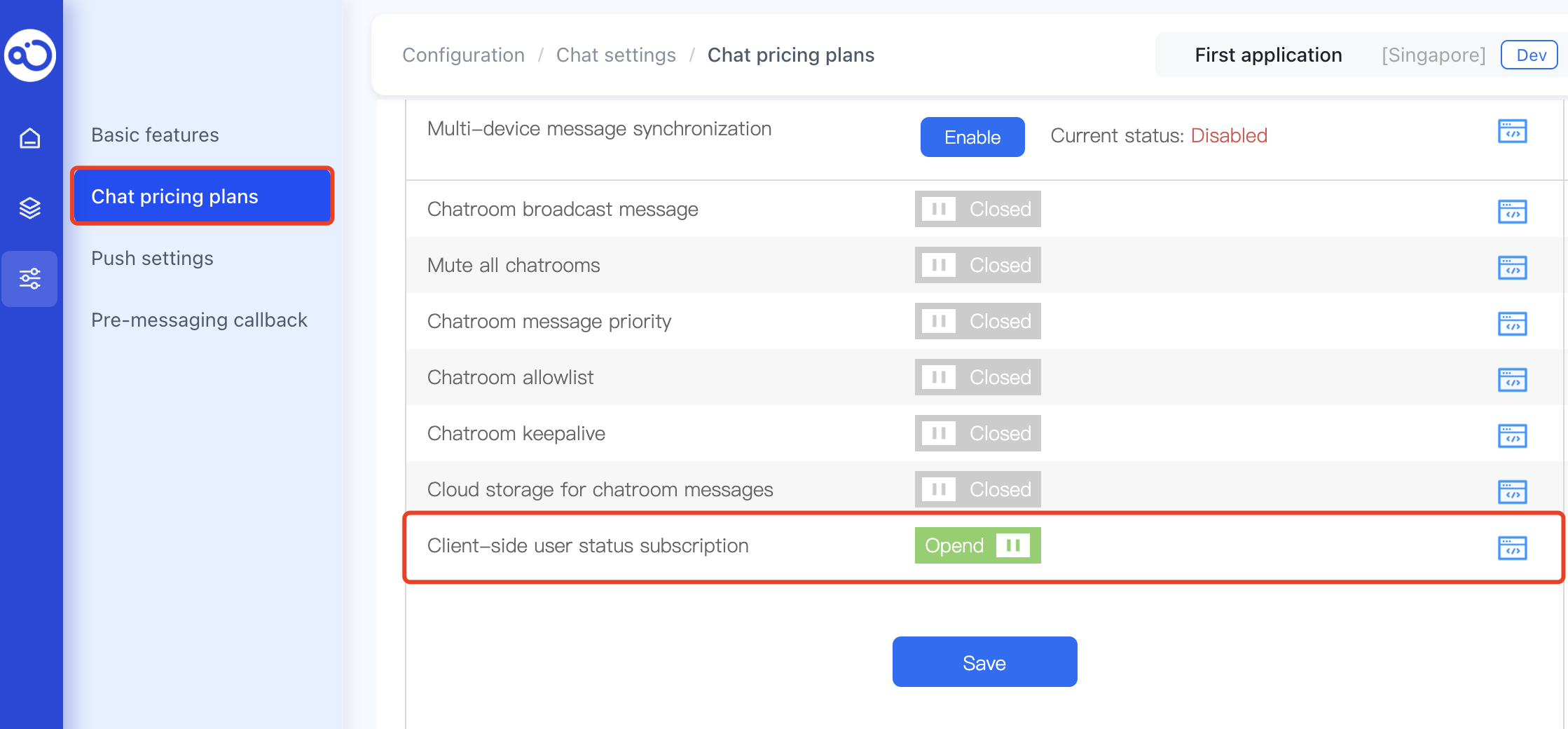
Enable Service
The User Online Status Subscription service is enabled by default in the development environment (dev). In production environments, this feature is enabled by default for Chat Pro Plan and is not supported for Chat Starter Plan.
Subscribe to User Online Status
To track the online status of specific users, use the subscribeUserStatus method.
-
Maximum 200 users can be subscribed in a single request.
-
A single user can be subscribed by up to 5000 users.
-
The total subscription limit is 1000 users.
Interface
RongIMLib.subscribeUserStatus(userIds, type, expiry)
Parameters
| Parameter | Type | Required | Description |
|---|---|---|---|
| userIds | string[] | Yes | Array of user IDs (1-200 users) |
| type | SubscribeType | Yes | Subscription type. Use SubscribeType.ONLINE_STATUS for online status subscription |
| expiry | number | Yes | Subscription duration in seconds (60-2592000) |
Example Code
// User IDs to subscribe (max 200 per request)
const userIds = ['user1', 'user2']
// Subscription duration in seconds (60-2592000)
const expiry = 180000;
// Specify subscription type as online status
const type = RongIMLib.SubscribeType.ONLINE_STATUS

RongIMLib.subscribeUserStatus(userIds, type, expiry).then((res) => {
  if (res.code === RongIMLib.ErrorCode.SUCCESS) {
    console.log('Subscription successful')
  } else if (res.code === RongIMLib.ErrorCode.RC_BESUBSCRIBED_USERIDS_COUNT_EXCEED_LIMIT) {
    console.log('Maximum subscription limit reached for user', res.code, res.data)
  } else {
    console.log('Subscription failed', res.code, res.msg)
  }
})
Unsubscribe from User Online Status
To cancel subscriptions, use the unSubscribeUserStatus method.
Interface
RongIMLib.unSubscribeUserStatus(userIds, type)
Parameters
| Parameter | Type | Required | Description |
|---|---|---|---|
| userIds | string[] | Yes | Array of user IDs (1-200 users) |
| type | SubscribeType | Yes | Subscription type. Use SubscribeType.ONLINE_STATUS for online status subscription |
Example Code
// User IDs to unsubscribe (max 200 per request)
const userIds = ['user1', 'user2']
// Specify subscription type to cancel
const type = RongIMLib.SubscribeType.ONLINE_STATUS

RongIMLib.unSubscribeUserStatus(userIds, type).then((res) => {
  if (res.code === RongIMLib.ErrorCode.SUCCESS) {
    console.log('Unsubscription successful')
  } else {
    console.log('Unsubscription failed', res.code, res.msg)
  }
})
Query Subscription Status Information
Use getSubscribeUserStatus to query status information for specified users and subscription types (max 200 users per query).
Interface
RongIMLib.getSubscribeUserStatus(type, userIds)
Parameters
| Parameter | Type | Required | Description |
|---|---|---|---|
| type | SubscribeType | Yes | Subscription type. Use SubscribeType.ONLINE_STATUS for online status subscription |
| userIds | string[] | Yes | Array of user IDs (1-200 users) |
Example Code
// User IDs to query (max 200 per request)
const userIds = ['user1', 'user2']
// Specify subscription type to query
const type = RongIMLib.SubscribeType.ONLINE_STATUS

RongIMLib.getSubscribeUserStatus(type, userIds).then((res) => {
  if (res.code === RongIMLib.ErrorCode.SUCCESS) {
    console.log('Query successful', res.data)
  } else {
    console.log('Query failed', res.code, res.msg)
  }
})
Query Subscribed Users' Online Status
Use getSubscribeUsersOnlineStatus to check online status for multiple subscribed users and friends simultaneously.
-
Supported from SDK version 5.28.0
-
To query friends' online status, enable the feature in Console: Chat > Chat settings > Friends > Chat SDK friend online status change notification
Interface
RongIMLib.getSubscribeUsersOnlineStatus(userIds)
Parameters
| Parameter | Type | Required | Description |
|---|---|---|---|
userIds | string[] | Yes | Array of user IDs (1-200 users) |
Example Code
RongIMLib
  .getSubscribeUsersOnlineStatus(['user01', 'user02'])
  .then(res => {
    if (res.isOk) {
      console.log('Query successful');
      res.data.forEach((item) => {
        console.log('User ID:', item.userId);
        console.log('Platform details:', item.details); // Online status across platforms
        console.log('Online status:', item.isOnline); // True if online on any platform
      });
    } else {
      console.log('Query failed:', res.code);
    }
  });
Paginated Query of Subscribed Users' Status
Use getSubscribeUserList for paginated queries when dealing with large numbers of subscribed users.
Interface
RongIMLib.getSubscribeUserList(type, pageSize, offset)
Parameters
| Parameter | Type | Required | Description |
|---|---|---|---|
type | SubscribeType | Yes | Subscription type. Use SubscribeType.ONLINE_STATUS for online status |
pageSize | number | Yes | Page size (1-200) |
offset | number | Yes | Pagination offset. Start with 0, then increment by pageSize (e.g., first page 0, second page 20, third page 40) |
Example Code
const type = RongIMLib.SubscribeType.ONLINE_STATUS
const pageSize = 20
const offset = 0

RongIMLib.getSubscribeUserList(type, pageSize, offset).then((res) => {
  if (res.code === RongIMLib.ErrorCode.SUCCESS) {
    console.log('Query successful', res.data);
  } else {
    console.log('Query failed', res.code, res.msg);
  }
});
Monitor Subscription Events
To receive real-time notifications of subscription changes, set up an event listener using addEventListener for the SUBSCRIBED_USER_STATUS_CHANGE event.
-
Call the listener before connecting the SDK.
-
Starting from version 5.10.1, subscription events include both user online status and user profile hosting types. Handle business logic based on the
subscribeType. -
Starting from version 5.12.0,
SubscribeTypeadds two new types: friend online status subscriptionFRIEND_ONLINE_STATUS(3)and friend user profile hostingFRIEND_USER_PROFILE(4).
- User status change subscription
/**
 * This notification is received when subscribed users' status changes.
 * After subscription expires, RongCloud SDK won't notify you automatically - please monitor expiration time yourself.
 */
RongIMLib.addEventListener(Events.SUBSCRIBED_USER_STATUS_CHANGE, (event) => {
  // Starting from v5.10.1, use subscribeType to determine whether it's user profile or online status
  console.log('Subscribed user status changed', event);
});
- Subscription relationship changes (multi-device sync)
/**
 * This notification is received when a user's subscription information changes on another device.
 * It can be used to update the user status on the current device to ensure subscription information consistency.
 */
RongIMLib.addEventListener(Events.SUBSCRIBED_RELATION_CHANGE, (event) => {
  // Starting from v5.10.1, use subscribeType to determine whether it's user profile or online status
  console.log('Subscription relationship changed', event);
});
- Subscription data synchronization completed
/**
 * Subscription data synchronization completed.
 * This notification is received after subscription data is successfully synchronized to the device or system, used for subsequent business operations.
 */
RongIMLib.addEventListener(Events.SYNC_SUBSCRIBED_USER_STATUS_FINISHED, (event) => {
  // Starting from v5.10.1, use subscribeType to determine whether it's user profile or online status
  console.log('Subscription data synchronized', event);
});