Chatroom Status Monitoring
Monitor Chatroom Status Changes
- This method is called back when the chatroom status changes.
- Chatroom status changes include chatroom reset, manual destruction of the chatroom by calling the IM Server API, and automatic destruction of the chatroom by the IM Server.
Method
Function(String? targetId, RCIMIWChatRoomStatus? status)? onChatRoomStatusChanged;
Parameter Description
| Parameter | Type | Description |
|---|---|---|
| targetId | String | Conversation ID |
| status | RCIMIWChatRoomStatus | The changed status of the chatroom |
Code Example
engine?.onChatRoomStatusChanged = (String? targetId, RCIMIWChatRoomStatus? status) {
//...
};
Chatroom Member Change Monitoring
Enable Service
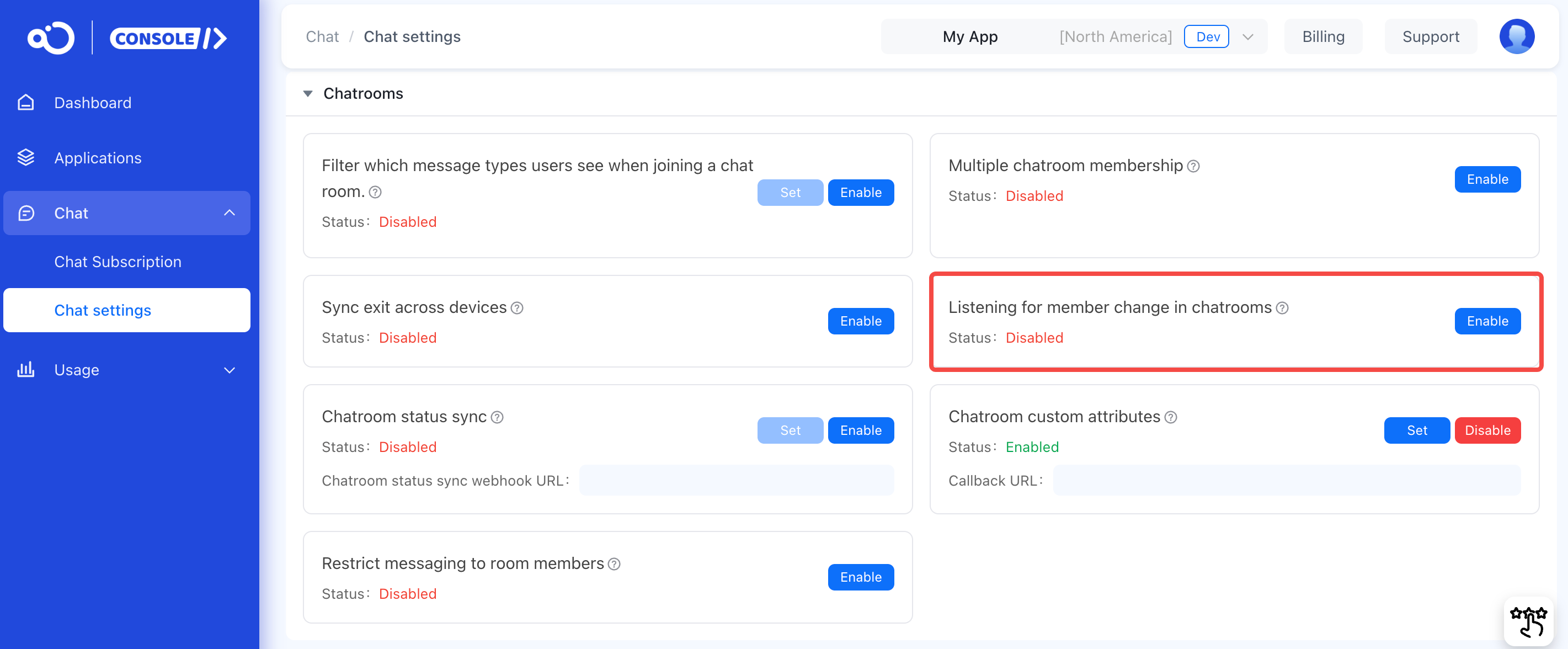
You can enable this feature in the RC Console by navigating to Chat > Chat settings > Chatroom > Chatroom Member Change Monitoring. Once enabled, the system will send callback notifications to other members in the chatroom in the form of messages when users join or leave the chatroom, which will increase the message volume.
Method
Function(String? targetId, List<RCIMIWChatRoomMemberAction>? actions)? onChatRoomMemberChanged;
Parameter Description
| Parameter | Type | Description |
|---|---|---|
| targetId | String | Conversation ID |
| actions | List<RCIMIWChatRoomMemberAction> | The events that occurred |
Code Example
engine?.onChatRoomMemberChanged = (String? targetId, List<RCIMIWChatRoomMemberAction>? actions) {
//...
};